
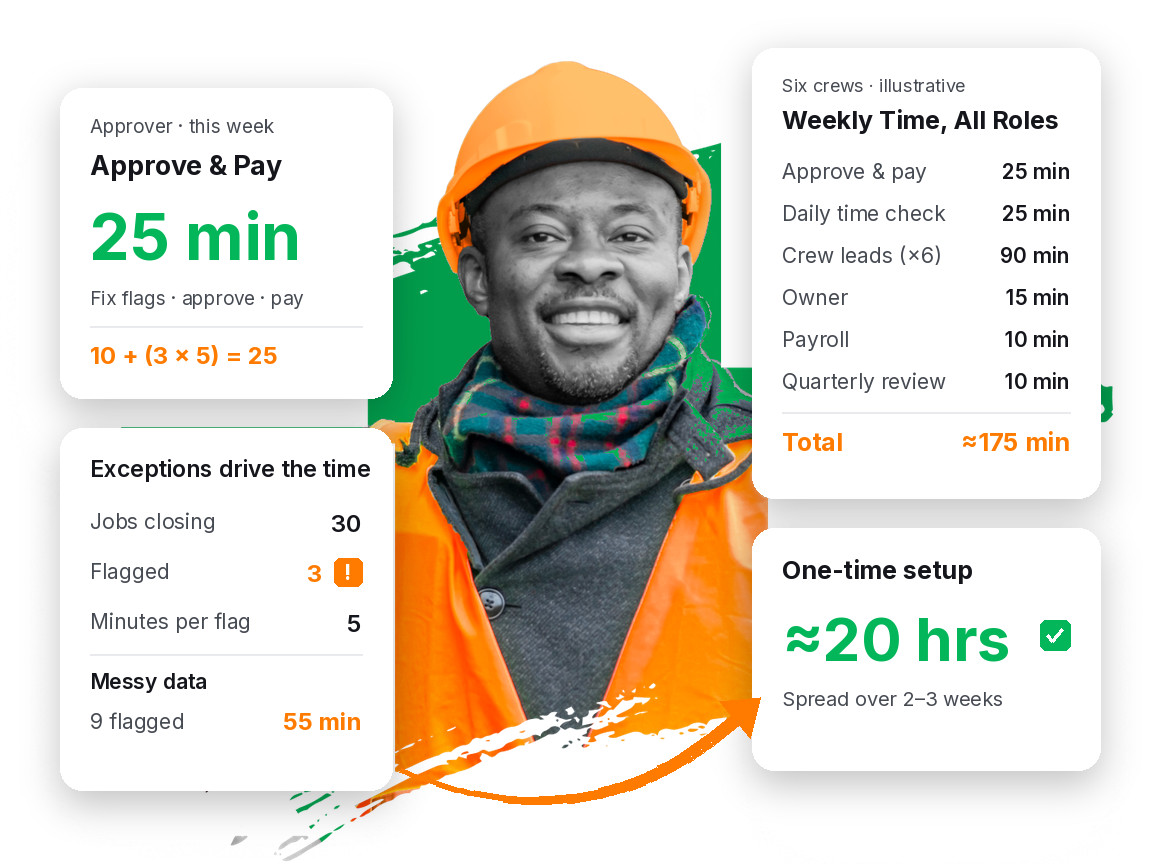
Below: a setup budget, a role-by-role weekly budget, what scales, where hidden time leaks in, and how to keep it short.
Why the time question decides whether the program survives
Owners rarely kill a performance pay program because they stopped believing in it. They kill it because it became a second job. Underneath the mid-program stall described in Why do most crew bonus programs fail after 90 days? is a time problem: a routine that takes two hours in February gets skipped in May.
So before you design the split, answer a plainer question: who does this every week, on what day, and how many minutes do they have? If you cannot name a person and a day, you have a launch, not a program.
The one-time setup budget
Most of the hard thinking happens once. Here is an illustrative setup budget for a company with six crews and about 24 field staff:
| Setup task | Who | Illustrative time |
|---|---|---|
| Pull 12 months of jobs, hours, and budgets | Office / ops | 6 hours |
| Check budgets against actual history | Owner + ops manager | 4 hours |
| Write the rules: split, gates, callbacks, payday | Owner | 2 hours |
| Load crews, roles, and job budgets into your system | Office | 4 hours |
| Train crew leads (6 × 30 minutes) | Ops manager | 3 hours |
| Kickoff meeting with all crews | Owner | 1 hour |
| Total | About 20 hours |
The step owners most want to skip, the budget check, saves the most time later. Every unwinnable budget becomes a weekly argument. The four tests in How do I know my labor baseline is honest before I start a crew bonus program? take a few hours and remove most of the exceptions you would otherwise handle every week for a year.
Rule writing pays back the same way. Once you have written down what counts as a callback and which paycheck a bonus lands on, the weekly routine is applying rules, not making decisions. Decisions are slow. Applying a rule is fast.
The steady-state weekly budget, role by role
After a month or so, with clean data, the same illustrative company (six crews, about 30 jobs or route-weeks closing a week) looks like this:
| Role | Weekly task | Illustrative minutes per week |
|---|---|---|
| Approver (ops or office manager) | Fix flags, approve clean jobs, release pay | 25 |
| Approver | Quick daily time check (5 minutes × 5 days) | 25 |
| Each crew lead (× 6) | Update % complete, confirm crew on the right job, about 3 minutes a day | 15 each, 90 total |
| Owner | Read the weekly scorecard, ask one or two questions | 15 |
| Payroll | Load the bonus file into the payroll run | 10 |
| Owner + ops | Quarterly review, spread across 13 weeks | 10 |
| Total across everyone | About 175 minutes |
Three things stand out.
First, the approver's core routine is about 25 minutes, in line with the common 20-to-30-minute benchmark.
Second, the daily time check is mostly work you already do for payroll: open shifts, wrong job codes, missed clock-outs. The bonus makes it matter more, because hours on the wrong job now move money.
Third, the biggest block sits with crew leads, spread so thin nobody feels it. Three minutes a day is the price of a score the crew can see. Skip it and you lose the thing that makes the program work.
About 175 minutes across nine people is under three hours of company time. Compare the upside in an illustrative week where each of the six crews beats its budgets by three hours: 18 hours saved at a $24 loaded rate is $432, split 50/50 into $216 for crews and $216 kept, plus freed hours. Example numbers, not Protiv data, but the time cost should be small next to what the program moves.
What actually scales: exceptions, not crews
Weekly time grows with exceptions, not crews:
Weekly approval time ≈ a fixed base + (flagged jobs × minutes per flag)
Illustrative numbers: the fixed base (approve everything clean in one pass, release pay) is about 10 minutes. Each flagged job (wrong-job hours, an odd budget, a callback, a quality hold) takes about 5 minutes.
- Clean data, six crews: 30 jobs, 3 flagged. 10 + (3 × 5) = 25 minutes.
- Messy data, six crews: 30 jobs, 9 flagged. 10 + (9 × 5) = 55 minutes.
- Clean data, twelve crews: 60 jobs, 6 flagged. 10 + (6 × 5) = 40 minutes, often split between two branch managers.
Doubling crews with clean data costs less time than six crews on messy data. When the routine gets long, do not add someone to grind through approvals. Fix why jobs get flagged. The usual causes:
- Time on the wrong job. Crews forget to switch jobs. Catch it daily, not in a Friday cleanup.
- Budgets that do not match the work. A route that is always over budget flags every week. Reset it from history with a written reason.
- Crew changes mid-job. If you cannot track who worked which hours on which job, every swap becomes manual math.
- Unwritten rules. If nobody wrote down what a callback costs, every callback becomes a meeting.
Routes show this well. Bonused stop-by-stop, a route flags every time one property runs long. A weekly route budget absorbs that noise into one approval, one reason the weekly unit usually wins in Should I bonus maintenance routes stop-by-stop or by the week?
The hidden time: questions you did not budget for
The time budget above leaves out one line that can quietly double it: crew questions and disputes.
Illustrative math: if crews only see what they earned on payday, say four people a week ask why a bonus was smaller than expected, at 15 minutes each to dig up the job, hours, and rule. That is 60 minutes a week, more than the whole approval routine, and each conversation costs a little trust.
Visibility is the cheapest time-saver you have. When crews see hours left and what they are on pace to earn during the job, the surprise disappears. When a quality hold shows up the day it happens, the conversation takes two minutes on site instead of fifteen in the office. (More on fair, visible gates in Won't performance pay make my crews rush the work?)
Failure modes: how the time budget blows up
The approver is also the dispatcher. In peak season the schedule always beats the approval queue. Give approvals to someone whose day is not all interruptions, or protect a fixed 30-minute block.
No fixed day. "When I get to it" becomes every other week, then monthly. Treat it like payroll.
Approving one job at a time. Give every clean job the scrutiny of a flagged one and 25 minutes becomes two hours. Review the flags; batch the rest.
Rules in one person's head. If only the owner knows how a callback is handled, every callback waits for the owner.
Copying between systems. Hours into a sheet, bonus totals into payroll: each copy adds minutes and a chance for a wrong payout, and a wrong payout costs more time than a late one.
How to run it in about 20 to 30 minutes a week
- Name the approver and the day. One person, one fixed day, early enough to settle before the payroll cutoff.
- Check time daily, briefly. Five minutes for open shifts, wrong jobs, and missed clock-outs, while people still remember the day.
- Run the routine in the same order. Fix flags. Update budgets that need it, with a written reason. Approve clean jobs together. Release pay. Send a shout-out or two.
- Track your flag count. If it climbs, find the cause before it becomes the routine.
- Give crew leads a 3-minute daily habit. Update progress and confirm the crew is on the right job as part of closing out the day.
- Hold a quarterly review. About two hours: labor share of revenue against baseline, what crews earned, which budgets were off, what changes next.
For the first two to four weeks, expect closer to an hour while you learn where exceptions come from. Watch the trend, not week one.
What it looks like when it runs
The public case studies show what a program moves when it keeps running. Promier Landscapes (Kingsport, TN; a 35-person crew; numbers verified by an outside landscaping CFO at B Advisory) ran one year with the same crew: revenue +17.5% ($7.5M to $8.8M), labor cost as a share of revenue 21.8% to 19.9% while wages went up, about $165,000 in field labor savings, and 4,877 hours moved back to billable work. Mulhall's Landscaping (Omaha; 30+ years in business) saw it sooner. Owner Mick Mulhall: "We saw the impact in one month."
Both are landscaping results. Other trades can set up the same weekly routine, but these are proof points, not a promise for every trade.
Where Protiv fits
Protiv is built to keep the routine short. It pulls jobs, budgets, crews, hours, and pay rates from the systems you already use. The Action Center walks the approver through the same order every week (fix, update jobs, approve, pay, shout-outs), and clear items approve in one click, which is how it stays near 20 minutes. Weekly Time Close flags open shifts, overlaps, and near-overtime before payroll. Crews see hours left and what they are on pace to earn in the crew app in English, Spanish, or Portuguese; payday Scorecards show what each person earned and why; and a Quarterly Business Review covers your numbers with you. The rules are yours. The software handles the minutes.
FAQ
How long does it take to set up a crew performance pay program?
Plan on about 20 hours of one-time work over two to three weeks for a company with a handful of crews: pulling a year of jobs and hours, checking budgets against what the work actually took, writing the rules, loading crews and budgets, and training crew leads. Protect the budget check above all: every unwinnable budget becomes a weekly exception. Bigger companies spend more total hours, usually branch by branch.
Does the weekly time go up as I add crews?
Less than you would expect. It tracks flagged jobs, not crews. With clean data, doubling from six crews to twelve might take the routine from about 25 minutes to about 40, and many companies split that between branch managers. With messy data, six crews can take longer than twelve clean ones. If time climbs, count your flags and fix the most common cause.
How much time do crew leads spend on a performance pay program?
A few minutes a day: updating job progress and confirming the crew is clocked to the right work before closing out. In the illustrative six-crew example, that is about 15 minutes per crew lead per week. It is the most valuable time in the program: it lets crews see their score during the job, and visible scores prevent most payday disputes.
Can I run a crew bonus program in a spreadsheet without it taking hours?
For a few crews with clean time data and simple rules, yes, at least for a while. It gets hard as jobs multiply, crews change mid-week, and hours get copied from your time system into the sheet and then into payroll. If the routine still takes well over an hour a week after the first month, fix your process or tools before you expand.
Soft next step
Before you launch, write down the real weekly budget: who approves, on what day, how many jobs close in a typical week, and how many will need a second look. If the math only works when nothing goes wrong, fix the data and rules first. If it lands near 20 to 30 minutes for the approver and a few minutes a day for crew leads, the program can survive busy season.
When you want to see how that routine would run on your own jobs and hours, talk to the Protiv team. For how the savings split itself works, start with Should I pay my crew hourly or by the job?